 Aztec
Aztec
Stress-test Aztec's decentralized future. Slash bad actors. Propose, attest, and govern — the training wheels are coming off.
1. Information
Website: https://aztec.network
Twitter: https://twitter.com/aztecnetwork
Discord: https://discord.gg/aztec
2. Service
- Explorer: https://explorer.anonid.top/aztec
- API: Comming soon
- RPC: Comming soon
3. Hardware requirement
3.1. Recommended hardware
CPU: 6 Cores, RAM: 16GB, Storage: 512GB NVMe
3.2. Minumum hardware
CPU: 4 Cores, RAM: 8GB, Storage: 250GB SSD
3.3. Recommended OS
Ubuntu 22.04 x86
4. Software
Docker (include in this guide)
danger
This project require to provide wallet private key, you should use a new wallet.
5. Update and install dependencies
sudo apt update && sudo apt upgrade -y
sudo apt install curl wget lz4 jq unzip ufw git screen -y
6. Guide to install
6.1. Install Docker
if [ ! -f /etc/os-release ]; then
  echo "Not Ubuntu or Debian"
  exit 1
else
    sudo apt update -y && sudo apt upgrade -y
    sudo apt-get remove --purge -y docker.io docker-doc docker-compose podman-docker containerd runc docker-ce docker-ce-cli docker-buildx-plugin docker-compose-plugin
    sudo apt-get autoremove -y
    sudo rm -rf /var/lib/docker /var/lib/containerd /etc/docker /etc/apt/sources.list.d/docker.list /etc/apt/keyrings/docker.gpg

    sudo apt-get update
    sudo apt-get install -y ca-certificates curl gnupg lsb-release
    sudo install -m 0755 -d /etc/apt/keyrings

    . /etc/os-release
    repo_url="https://download.docker.com/linux/$ID"
    curl -fsSL "$repo_url/gpg" | sudo gpg --dearmor -o /etc/apt/keyrings/docker.gpg
    sudo chmod a+r /etc/apt/keyrings/docker.gpg
    echo \
        "deb [arch=$(dpkg --print-architecture) signed-by=/etc/apt/keyrings/docker.gpg] $repo_url $(. /etc/os-release && echo "$VERSION_CODENAME") stable" | \
    sudo tee /etc/apt/sources.list.d/docker.list > /dev/null

    sudo apt update -y && sudo apt upgrade -y
    sudo apt-get install -y docker-ce docker-ce-cli containerd.io docker-buildx-plugin docker-compose-plugin

    if sudo docker run hello-world; then
        sudo docker rm $(sudo docker ps -a --filter "ancestor=hello-world" --format "{{.ID}}") --force 2>/dev/null || true
        sudo docker image rm hello-world 2>/dev/null || true
        sudo systemctl enable docker
        sudo systemctl restart docker
        clear
        echo -e "\u2022 Docker Installed \u2714"
    fi
fi
6.2. Enable firewall
danger
If you already change SSH to another port, please change it bellow otherwise you will lost connection to your server
ufw allow 22
ufw allow ssh
sudo ufw allow 40400/tcp
sudo ufw allow 40400/udp
sudo ufw allow 8080
echo 'y' | ufw enable
sudo ufw reload
6.3. Cleanup old files
bash <(curl -Ls https://raw.githubusercontent.com/DeepPatel2412/Aztec-Tools/refs/heads/main/Aztec%20CLI%20Cleanup)

rm -rf $HOME/aztec && mkdir $HOME/aztec && cd $HOME/aztec
7. Setup Validator varable
We need setup some varable:
- Sepolia RPC (SepoliaRPC) - Get it from a third party provider or run your own RPC
- Beacon RPC (BeaconRPC) - Get it from a third party provider or run your own RPC
- Wallet Private Key (YOURPRIVATEKEY) - Your PrivateKey (include 0x) for safety purposes, use a new wallet instead of your main wallet
- Wallet Address (YourWalletAddress) - Include 0x - that is linked to the private key you used (fund with Sepolia Eth).
- IP address - Your vps IP address
info
Remember change to your info in <SepoliaRPC>, <BeaconRPC>,<YOURPRIVATEKEY>,
SepoliaRPC="<SepoliaRPC>"
BeaconRPC="<BeaconRPC>"
ValidatorPrivKey="<YOURPRIVATEKEY>"
CoinbaseAddr="<YourWalletAddress>"
P2PIP=$(curl ipv4.icanhazip.com)
Don't worry about CoinbaseAddr varable, it only a name, not your Coinbase wallet address 😂
7.1. Create enviroment for docker
sudo tee $HOME/aztec/.env > /dev/null <<EOF
ETHEREUM_RPC_URL=$SepoliaRPC
CONSENSUS_BEACON_URL=$BeaconRPC
VALIDATOR_PRIVATE_KEYS=$ValidatorPrivKey
COINBASE=$CoinbaseAddr
P2P_IP=$P2PIP
EOF
7.1. Remove private key varable
unset ValidatorPrivKey
7.1.1. Create docker compose file
sudo tee $HOME/aztec/docker-compose.yml > /dev/null <<EOF
services:
  aztec-node:
    container_name: aztec-sequencer
    image: aztecprotocol/aztec:2.0.3
    restart: unless-stopped
    network_mode: host
    environment:
      ETHEREUM_HOSTS: \${ETHEREUM_RPC_URL}
      L1_CONSENSUS_HOST_URLS: \${CONSENSUS_BEACON_URL}
      DATA_DIRECTORY: /data
      VALIDATOR_PRIVATE_KEYS: \${VALIDATOR_PRIVATE_KEYS}
      COINBASE: \${COINBASE}
      P2P_IP: \${P2P_IP}
      LOG_LEVEL: info
    entrypoint: >
      sh -c 'node --no-warnings /usr/src/yarn-project/aztec/dest/bin/index.js start --network testnet --node --archiver --sequencer'
    ports:
      - 40400:40400/tcp
      - 40400:40400/udp
      - 8080:8080
    volumes:
      - /root/.aztec/testnet/data/:/data
EOF
7.1.2. Start docker with compose
docker compose up -d
docker compose logs -fn 1000
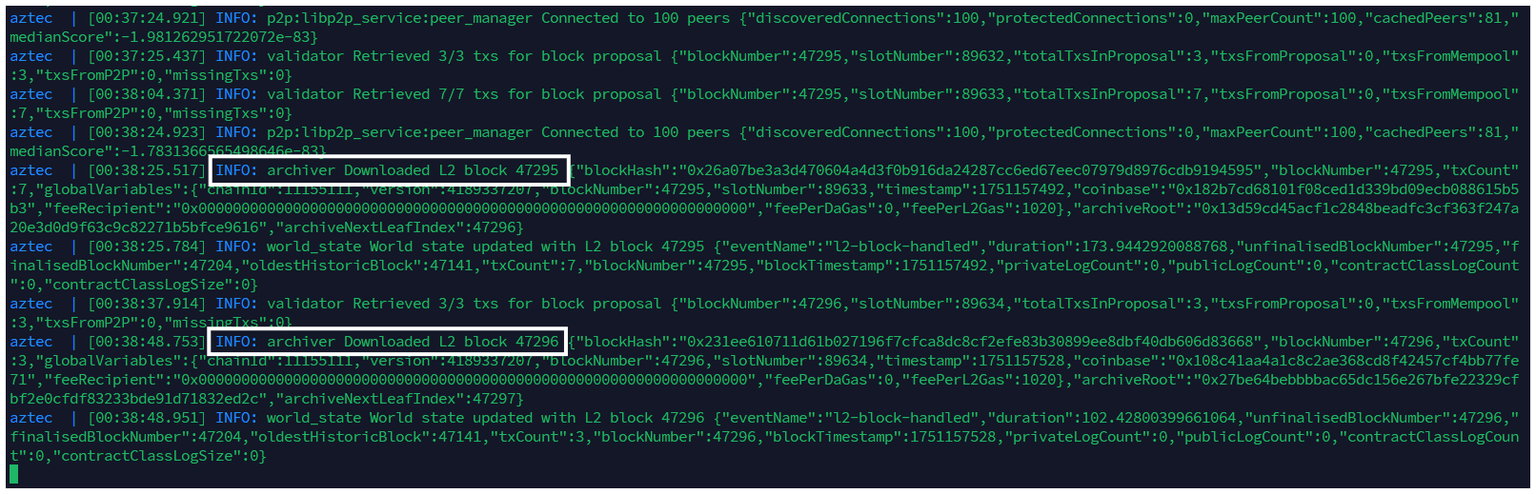
Then you will see in your screen your node block height at INFO: archiver Downloaded L2 block ...
8. Check log and sync
8.1. Check logs
cd $HOME/aztec
docker compose logs -fn 1000
wget https://raw.githubusercontent.com/cerberus-node/aztec-network/refs/heads/main/sync-check.sh && chmod +x sync-check.sh && ./sync-check.sh